As an admin, you can create Self Check-Ins for anyone in your organization.
Go to the "Reviews / Check-Ins" section in the main navigation. Then select "Check-Ins".

Once there, select the "Create a Check-in" button.

You will then have 3 options: Create a New Check-in, Copy from Previous, or Add to Existing.

What is a Collection:
One thing to note about self check-ins that is different from reviews, is that we have introduced the "collection concept". This will help you better analyze and monitor trends in the future (more tools coming to Threads for you!). What a collection means, is that each collection can only have the reviewer/employee being scored once. A collection consists of check-ins with the same title and the same due date. Each time you create a check-in, you either need to create a new collection, copy one or add to an existing collection. Below is an example of (Creating a New Check-In and Adding to an Existing Check-In).
Creating a New Self Check-In:

You will enter a Title and a Due Date for this new check-in / collection.

After selecting Next, you can choose to assign reviewers now, or you can skip.

Skipping for now means you can assign reviewers later, such as after customizing the check in questions.
If choosing to assign now, the following is available in the drop down.

For this example, all my employee level users are hourly, so I only want them to receive this self check-in.
Once I select "All Employees" and select "Next" I am shown the list of all of the individuals who will be sent the self check-in.
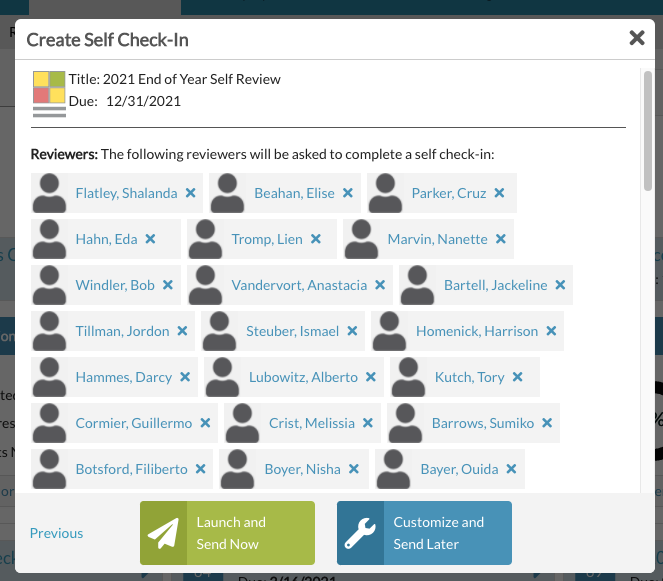
At the bottom there are two options: Launch and Send Now or Customize and Send Later
Launch / Send now is only available if you chose to assign reviewers in the previous step. Launch / Send now alerts the assigned reviewers immediately that they now have a check in to complete. The collection itself moves from "Draft" to "Live" status.
Customize and Send Later keeps the check-in collection in Draft status for you to return to at a later time to "Launch". You can customize the questions within the check-in at this point. A collection in Draft status does NOT give any of the reviewers access to their check-in for completion.
Once you Launch / Send Now, the reviewers assigned will receive both an email and a to do list notification that they have a self check-in to complete.
For more help, also see:
How to Customize a Self Check-In
Launching a Check-In Collection
Viewing a Collection of Self Check-Ins
Managing Self Check-In Collections
How to View / Monitor Self Check-Ins
How to Send Self Check-In Reminders
How to Edit Title / Due Date of Self Check-In
0 Comments