As an admin, you have access to everyone within your org's self check-ins.

Go to "Reviews / Check-Ins" within the main navigation, and then select "Check-Ins".

The overview tab will load, showing all of your collections of check-ins.
Click on the title for whichever collection you would like to view.

This will open the Collection View.
(Note: you will not be able to see any of the responses until the user marks their self check-in complete)
You can also see all check ins for all collections by clicking on "Manage".
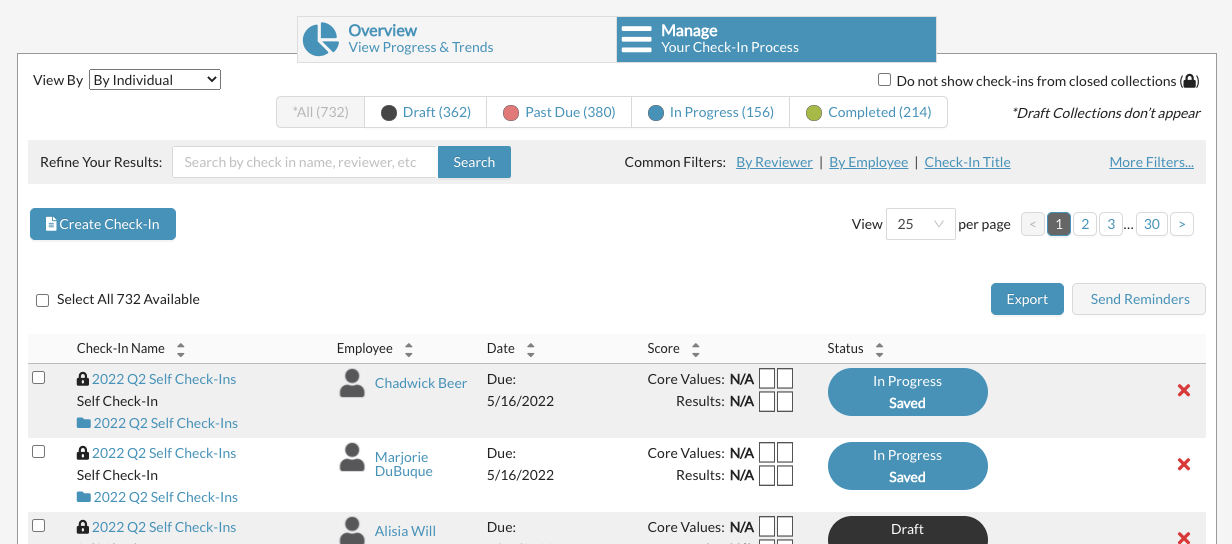
Make sure the "View By" is set to individual.

The Check-In manage list will show all of the individual Self Check-Ins across any collection (only. those from Live or Closed collections)
If you want to NOT show any check-ins from closed collections, check this box.

You can also filter the list by status.

- Drafts are check-ins that have not been started.
- Past Due are check-ins that have not been marked complete by the due date.
- In Progress shows check-ins that have been started but the individual has not marked it complete yet. (note: you will not be able to see the responses entered until the individual has marked the check-in "complete")
- Completed are the check-ins in which the reviewer has marked the check in complete.

You can also search or filter the list many ways.
Click on "more filters" to see all the options.

Want to see a whole collection together?
Within the check-in list, each check-in has its collection name underneath it. Click on the collection name that has the folder icon next to it.

This will open the Collection View.
(Note: you will not be able to see any of the responses until the user marks their self check-in complete)
Also see:
How to Send Self Check-In Reminders
0 Comments