Access your reviews by clicking on the Reviews tab, located on the main navigation.

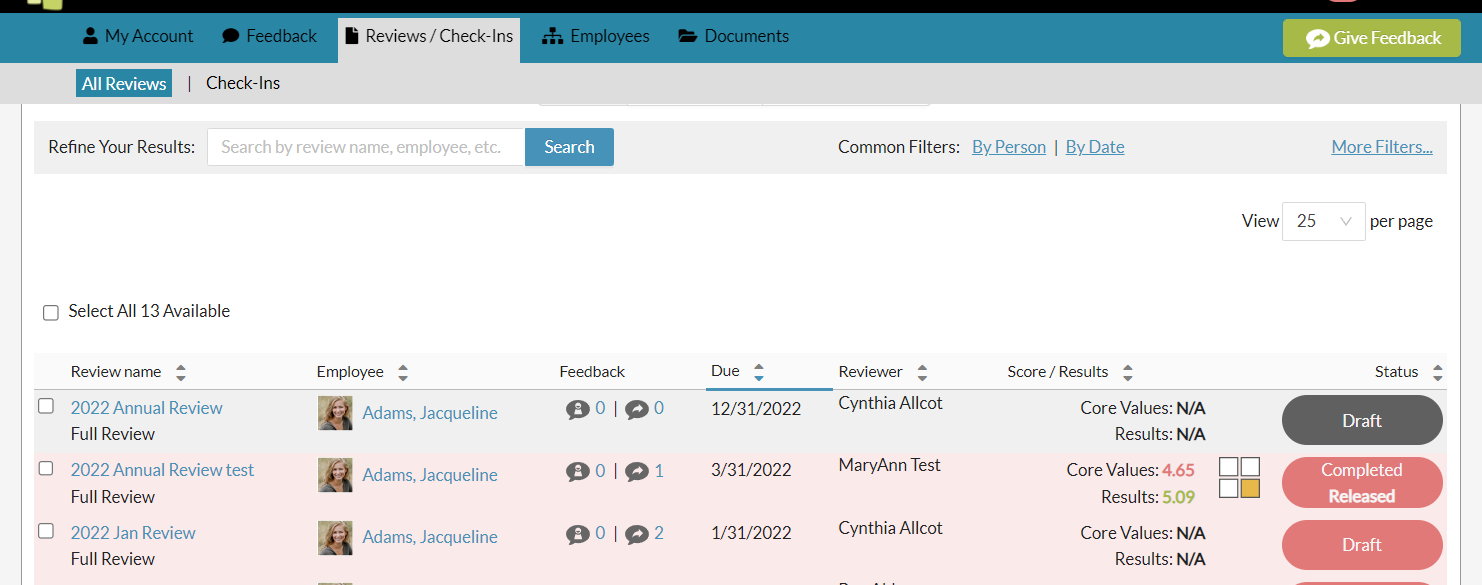
The review list shows all of your reviews, with separate views for each status.
All: Shows you all your reviews across all statuses.
Drafts: Shows all reviews that are in the draft status.
Completed: Shows all reviews released to you by your manager (pending your acceptance). And all reviews Accepted (by yourself or a designated leader).
The review list, offers additional information and/or navigation in the account.

Review name: Clicking on the review name will open the review detail page.
Employee: Clicking on the employee name will offer options to view your profile page or allow you to give feedback.
Feedback: Clicking these will show any visible feedback received, self feedback or feedback given, during this review period.
Manager: This lists the manager responsible for completing and releasing the your review.
Due: Shows the due date of the review. Note - past due reviews are highlighted in red.
Score: This displays, where on the graph, the employee has been scored. Hovering your cursor over the quadrant will display the scores received for the core values and results criteria.
Status: This lists the current status of the review.
Your Threads Support team is hear to assist you!
If you have additional questions, please contact us as support@threadsculture.com.
0 Comments